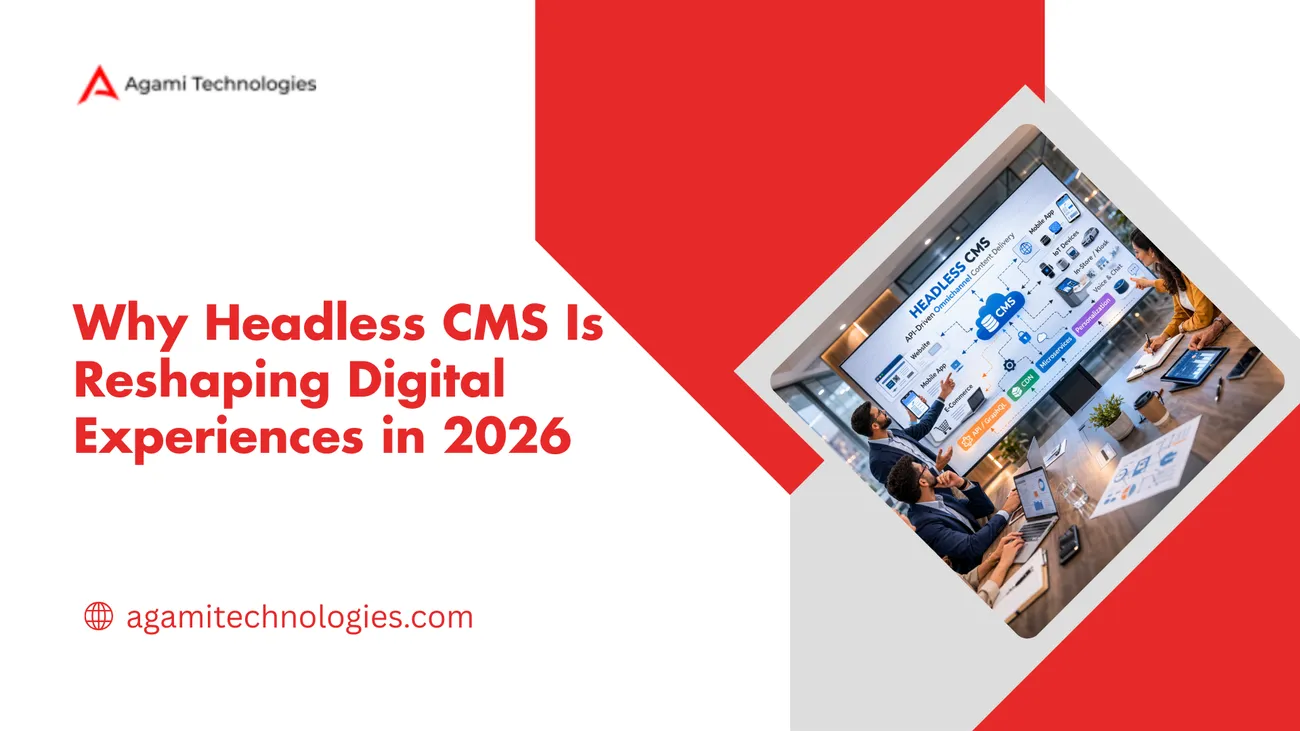
Why Headless CMS Is Reshaping Digital Experiences in 2026
This blog explains why enterprises are adopting headless CMS and how to do it at scale. It defines headless as decoupling content storage from presentation, highlights the benefits of omnichannel delivery, developer velocity, scalability, security, and futureproofing, and contrasts headless with traditional CMS. It outlines common enterprise use cases, API-first integration patterns, composable architecture, migration strategies (phased, strangler pattern), operational needs, selection criteria, measurable KPIs, and frequent pitfalls with fixes (content modeling, governance, previews, caching). The purpose is to give practical guidance for evaluating and executing enterprise headless projects and to offer Agami as an implementation partner.
At Agami Technologies, we regularly get this question from CTOs, product leaders, and architects evaluating modern digital platforms. The topic of discussion has evolved. It used to be "should we go headless," but now it's more like "how do we adopt headless at scale.
From my point of view, this change is significant because the level of commitment is different. On the one hand, a team wants a faster time to market and a consistent omnichannel content delivery. On the other hand, they desire a modern content management system that goes well with a composable architecture, not one that is the stack dictator.
What headless CMS mean in 2026
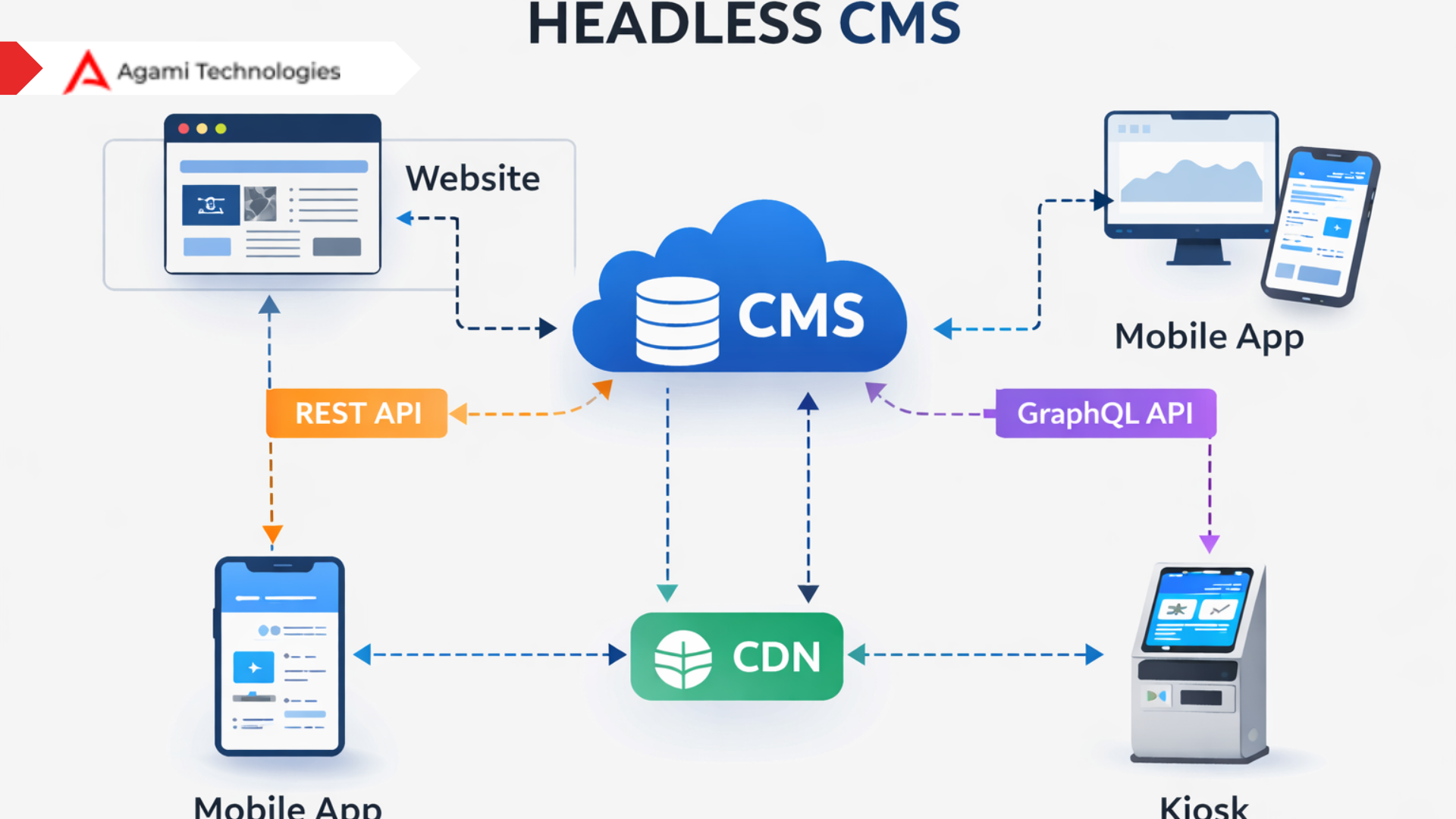
Headless CMS is not a fad. It describes a decoupled CMS architecture where content storage and content presentation are separate. The CMS manages content as structured data, and the frontend consumes that content via APIs. Because of that separation, you can deliver the same content to a website, mobile app, kiosk, or voice assistant without rebuilding your authoring experience for each channel.
In short, headless CMS puts content at the center and presentation at the edge. The content is reusable, API first, and ready for omnichannel content delivery. With a microservices architecture, CMS patterns, each part of your stack can scale, update, or be replaced independently.
Headless CMS vs traditional CMS: a quick comparison
You probably already know the classic tradeoffs. Still, here is a concise side by side that I find helps teams decide.
- Traditional CMS Content and presentation are tightly coupled. Themes, templates, and content live together. This simplifies getting started. It becomes a constraint as you add channels and custom apps.
- Headless CMS Content is exposed through APIs and used by many frontends. You get flexibility and reuse. You also need stronger governance, a content model, and integration discipline.
Think of it this way. Traditional CMS is a Swiss Army knife. It is handy for single website projects. Headless CMS is like a set of power tools. They are more flexible, but you need the right setup and practice to use them safely.
Why headless is winning in 2026
There are practical drivers behind the trend. I want to highlight the ones that matter to enterprise teams making long term decisions.
- Omnichannel expectations: Users expect a consistent brand experience across web, mobile, email, in-store screens, and smart devices. A headless approach simplifies delivering identical content to all these endpoints.
- Developer velocity: Developers can choose frameworks and renderers that suit their needs. They are not locked into PHP or a monolithic stack. That improves productivity and lets teams adopt new frontends without migrating content.
- Scalability and resilience. With decoupled services and microservices architecture, CMS patterns, you scale parts of the system independently. That reduces blast radius during outages.
- Security and compliance: Reducing server side surface area for public content lowers risk. For private or regulated content, API gateways and fine grained access controls are easier to implement when content and presentation are decoupled.
- Futureproofing Because content is structured and API accessible, adopting new channels or analytics tools becomes a configuration task rather than a migration project.
Common enterprise use cases
In my experience, these are the scenarios where enterprises extract the most value from a headless CMS.
- Global multi-site deployments. You maintain a single content model for multiple regional sites, localize content, and reuse assets across markets.
- Complex product catalogs Marketing and commerce teams need rich content decoupled from the storefront so product information can feed multiple touchpoints.
- Headless commerce and micro frontends Businesses pair headless CMS with composable commerce to iterate on experiences without replatforming the entire stack.
- IoT and connected experiences. Devices and non browser clients consume content via APIs. This is especially common in retail, automotive, and healthcare.
How API first CMS changes integration
API first CMS means the product is built with APIs at the core. You get REST or GraphQL endpoints and SDKs. That sounds obvious, but it changes how teams integrate.
First, integrations become predictable. You fetch content from the CMS the same way your mobile apps do. You can cache responses via CDNs and reduce backend load. Second, automation becomes straightforward. Build CI flows that validate content models, run fixture-based tests, and deploy content schema changes safely.
Here is a very simple example. You want to render a product detail page across the web and an in-store kiosk. The CMS stores the product description, specs, and assets as structured fields. Your web frontend calls the CMS API and builds a rich page. The kiosk calls the same API and uses a lighter layout. You update the copy in one place. Both endpoints show the change instantly. No content duplication. No costly replication.
Composable architecture and digital experience platforms in 2026
Composable architecture is not an adjective. It is a design approach where you assemble best of breed services to form a platform. In 2026, digital experience platform 2026 conversations focus on how services mesh, not which vendor rules everything.
Headless CMS fits into this ecosystem as the content hub. Paired with a commerce engine, personalization service, customer data platform, and an analytics layer, you can build targeted experiences. That modular approach makes upgrades safer and lowers vendor lock in.
I have noticed teams succeed when they pick a single source of truth for content early. That prevents the "content scattered across ducts and silos" problem later on. It also makes testing and personalization simpler.
Microservices architecture CMS: the technical shape
When we talk about microservices architecture CMS, we mean breaking the system into focused services. One service is responsible for content storage, another for rendering previews, another for asset processing, and so on. This provides flexibility but costs discipline.
These are the practical considerations I share with engineering teams during planning sessions:
- Design your content model with reuse in mind. Think in terms of content types and references.
- Use an API gateway to centralize authentication, rate limiting, and logging.
- Cache aggressively at the CDN level. That reduces API load and improves performance.
- Use eventing for async updates. When content changes, publish events that downstream services consume.
- Keep rendering logic in the front end. Let the CMS deliver raw, structured data.
Practical benefits of headless CMS for enterprise teams
Let's be concrete. What do leaders actually get when they switch? Here are measurable wins I have seen across projects.
- Faster time to market. Parallel workstreams become possible. Frontend teams deliver new UI without waiting for content migration. Marketing teams publish without developer intervention.
- Lower cost of change: Smaller, focused updates require less coordination. You can replace parts of the stack gradually, lowering risk.
- Improved personalization. Structured content makes it easier to assemble personalized experiences. You plug into CDP and personalization engines and reuse the same content blocks.
- Better developer experience: Teams can pick frameworks, testing tools, and CI patterns that suit their needs. That reduces technical debt and attracts talent.
Common mistakes and how to avoid them
Adopting headless is not a silver bullet. I have seen several pitfalls come up repeatedly. Here are the ones that matter and how to avoid them.
- Poor content modeling Mistake: Treating content like pages and duplicating fields across types. Fix: Invest time in a canonical content model. Model content as reusable building blocks.
- No governance Mistake: Giving everyone free rein in the CMS and ending up with inconsistent data. Fix: Define roles, validation rules, and a change control process.
- Underestimating preview and editorial needs. Mistake: Shipping a CMS without preview workflows or in-context editing for authors. Fix: Implement preview endpoints and in-context editing early. Authors need to see the content the way customers will.
- Thinking API is enough Mistake: Assuming exposing content via APIs solves everything. Fix: Pair APIs with proper caching, monitoring, and SDKs. Invest in developer docs and examples.
- Slow data migrations Mistake: Planning one big bang cutover. Fix: Migrate in phases. Reuse legacy content through adapters while you iteratively improve the new model.
Migration strategy: an incremental playbook
Replatforming to an enterprise headless CMS does not have to be a high risk project. You can also explore our detailed insights in the Agami Blog where we break down real world digital transformation case studies.
I prefer a phased migration that produces value at each step.
- Audit and prioritize. Catalogue your existing content. Identify high-value pages and API consumers. Prioritize what to migrate first.
- Define your canonical content model. Build content types that support reuse. Keep it simple to start. Expand the model as you learn.
- Build a strangler facade. Route selected traffic to the new frontend while leaving the rest on the legacy system. This reduces risk and allows testing at scale.
- Implement preview and editorial workflows. Make sure authors can preview changes across channels before publishing. That prevents surprises.
- Automate tests and validations. Add unit and end to end checks for content shapes. Validate content models during CI to catch schema drift.
- Gradually decommission legacy systems. Once traffic is stable and the team is comfortable, retire stepped down pieces. Keep an eye on analytics and error rates during each step.
One practical tip I recommend is to start with one high traffic, high impact use case. For example, move the product detail pages first. Those usually have a clear structure and high ROI when improved. From there, expand to marketing pages and then to more complex content.
Operational considerations for enterprise headless CMS
Ten years ago, teams worried mostly about hosting and uptime. Today, there are more nuanced operational needs. Here are the ones that typically come up for enterprises.
- Observability Instrument APIs, CDN, and the rendering layer. Track latency and error rates per endpoint, not just per service.
- Content versioning: Authors need to rollback and audit changes. Version control for content is as important as it is for code.
- Access control, Fine grained permissions by role, content type, and region, reduce compliance risk.
- Performance Use CDNs, edge caching, and pre-rendering when possible. Cache invalidation strategies matter more with lots of channels.
- Disaster recovery Plan backups for content, but also for schema and permissions. Practice is restored periodically.
Selecting the right enterprise headless CMS
Many products call themselves headless. Your vendor selection should focus on realistic criteria rather than marketing claims. Here are the evaluation areas I recommend.
- Enterprise features: Look for workflows, granular permissions, localization support, and content versioning.
- API maturity: Ensure the product supports both REST and GraphQL, provides SDKs, and has predictable SLAs.
- Extensibility: Can you plug in image transformations, personalization, or custom eventing? Does it fit into your middleware?
- Operational fit: Evaluate observability, backup, and support. Ask for a runbook and example DR procedures.
- Cost model: Understand pricing tied to API calls, authors, assets, and any CDN or edge features. Model for your peak usage.
- Partner ecosystem: A strong ecosystem matters for integration speed. Agami focuses on end to end migrations and can augment teams with architecture and implementation support if you need it.
Case example: staging a migration for a retail brand
Let me walk through a short example I worked on. A retail client had 30 regional sites, each managed in a legacy CMS. They needed faster promotions, consistent product pages, and better mobile performance.
We started by auditing the content and traffic patterns. Product detail pages were the highest priority. We created a canonical product content model with fields for head tags, descriptions, media, and attribute sets. Then we built a headless API that delivered the same structured product to the web storefront and a Progressive Web App.
We used a strangler pattern to route 20 percent of traffic to the new site first. During that phase, we tested CDN caching rules, preview workflows, and author training. When we were confident, we increased traffic and then migrated additional content types like category pages and blog content.
The results were straightforward. Page load times improved substantially. Marketing could run promotions faster. The brand also reused content for in-store digital displays. Those wins paid for the migration within a year.
How Agami helps
At Agami, we focus on helping enterprises replatform to modern content management systems through our enterprise CMS implementation services. and implement composable architecture. We combine advisory and delivery. That means we help with strategy, and we also roll up our sleeves to implement the migration.
We have experience across multiple enterprise headless CMS platforms and the supporting tech stack. That includes API design, CDN strategy, preview workflows, and legacy integration. If you want a partner who has done this several times and knows the common pitfalls, we can help accelerate your project.
Questions to ask before you go headless
Before you sign a contract or spin up a new repo, ask these questions with your team. They will expose gaps early.
- What are the primary channels we must support today and in three years?
- Who owns the canonical content model and who enforces it?
- How will we support previewing content on each channel?
- What is our caching and CDN invalidation strategy?
- Which parts of the legacy system need adapters and which can be retired?
- What metrics will tell us the migration is successful?
Answering these keeps the project grounded. It also makes vendor evaluations more concrete.
Common metrics and KPIs
Measure the migration with a few clear metrics. Here are the ones I recommend tracking from day one.
- Time to publish: how long does it take an author to publish a page or content block?
- Page performance: TTFB and Core Web Vitals for key pages
- Developer cycle time: time from ticket to deployment for frontend changes
- API latency and error rate: monitor endpoints used by client applications
- Author satisfaction: qualitative feedback from content teams
Frequently Asked Questions
1. What is headless CMS architecture in simple terms?
Headless CMS architecture separates content management from content presentation. Content is stored as structured data and delivered through APIs to websites, apps, and other digital channels.
2. Is headless CMS better than traditional CMS for enterprises?
For enterprises managing multiple channels, complex integrations, and personalization, headless CMS offers more flexibility and scalability. For single website projects, a traditional CMS may still be sufficient.
3. How risky is migrating to an enterprise headless CMS?
Migration risk depends on planning. An incremental strategy using phased rollout, strong content modeling, and traffic routing reduces operational disruption significantly.
Final thoughts
Moving to a headless CMS is a strategic decision. It pays off when you want flexibility, omnichannel delivery, and better developer velocity. But it also requires investment: in content modeling, governance, and engineering practices.
Start small. Migrate a high impact use case, measure, and expand. Avoid treating APIs as a silver bullet and design for authors as much as for developers. If you do that, headless becomes a practical enabler of modern digital experience, not just a buzzword.
If you want a practical partner to help with strategy, architecture, or hands on migration, Agami can help. We specialize in enterprise headless CMS projects and composable digital experience platforms. We work with teams to reduce risk and increase speed so you get real business outcomes.
Helpful Links & Next Steps
Ready to discuss how headless can reshape your digital experience? Book a Meeting Today.